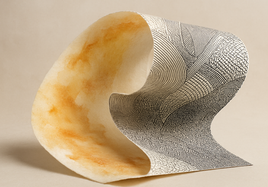


Duotone printing can describe a physical two-ink process. It can also describe a visual style made on a computer. Those ideas are related, but they are not the same. A true two-ink duotone combines two separately prepared image components using two physical inks. An RGB file can reproduce a similar look through pigment inkjet printing. It does not turn that printer into a two-ink press.
What Duotone Printing Physically Means
In physical duotone printing, the final image is built from two distinct ink components. Each component carries selected parts or tones from the artwork. The two printed components work together on the paper to create the finished image.
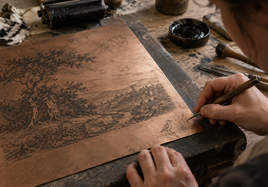
The exact tools depend on the printmaking method. A matrix is the prepared surface that holds and transfers an image. It might be a stone, plate, screen, or another process-specific form. It is not correct to say that every duotone uses plates.
Lithography gives a clear example. According to the Tamarind Institute lithography process guide, each added color generally needs a separate drawing on another stone or plate. That physical separation is central to how the color image is made.
How Two Separations Become One Printed Image
A separation is one prepared image component assigned to an ink. For a two-color lithograph, the artist and printer prepare the image information for each color on its own stone or plate. Ink is rolled onto the first matrix. Paper is placed over it and passed through the press. Pressure transfers that ink to the sheet.
The printer then uses the second matrix and its ink. The paper passes through the press again. Registration keeps the two impressions in the intended positions. In lithography, small marks can help align the sheet with each matrix.
The image information does not have to follow one fixed recipe. One ink might carry broad shapes while another adds detail. Both inks might share light, middle, and dark areas in an artist-directed balance. What matters is that two prepared components and two ink applications form the image.
Can an RGB File Reproduce the Duotone Look?
Yes. An RGB file can hold an image designed to look like it uses only two colors. RGB means red, green, and blue. These values describe the colors in a digital image. They can encode a warm brown and deep black look, for example, even when the file contains many unique RGB values between those visual endpoints.
A professional pigment inkjet workflow can print that prepared appearance as a fine art reproduction. Pigment inkjet printing places tiny drops of pigment-based ink on paper or canvas. The Stackhouse guide to giclee printing explains this process and the role of pigment inks, archival media, file preparation, and color management.
This method reproduces the duotone look. It does not create two dedicated separations that are printed with only two selected physical inks. That qualification matters when the making process is part of the artwork.
What the Pigment Printer Actually Does With RGB Data
An embedded RGB profile tells color-aware software how to interpret the file values. An ICC profile is data that describes how digital color values relate to a standard color space. Color management then translates the intended colors for the printer and paper.
The printer driver calculates how to use the device’s available inks. A duotone-looking RGB image may therefore use several physical colorants. Its red, green, and blue file channels do not directly command three cartridges, printheads, or specific inks.
The International Color Consortium FAQ explains that many inkjet devices generate added ink channels from RGB or CMYK data. Those extra colorants can improve printable color range and print quality. The driver performs the conversion.
Before submitting work, use the Stackhouse file preparation guide to review supported RGB formats, embedded profiles, resolution, and cropping. Stackhouse prefers embedded Adobe RGB (1998), while embedded sRGB is also accepted. A high-resolution JPEG, TIFF, or PNG can preserve the prepared duotone appearance.
Why the Two Outputs Are Not the Same Object
A true two-ink duotone is built from two physical ink applications. Its image components come from separate matrices made for the chosen print process. That physical structure is part of the finished object and its production history.
An RGB pigment reproduction begins with color values in a digital file. Software and a printer profile translate those values. The printer driver then renders the image through the machine’s available ink set. It may create a close visual relationship to the prepared artwork, but it reaches that appearance by a different path.
Paper, physical colorants, printable color range, and color transformation can shape the result. Color management seeks accurate reproduction. When an exact color cannot be produced, it creates a suitable approximation. A similar appearance does not establish physical identity, and an exact match between these different workflows cannot be guaranteed.
Choose Based on What the Artwork Requires
Choose separated two-ink production when two actual inks and the selected printmaking process are integral to the work. This may be the right path when the artist intends the matrices, ink choices, and repeated press passes to define how the piece is made.
Choose RGB pigment inkjet when the main goal is to reproduce an already prepared duotone appearance as a detailed fine art image. Stackhouse giclee fine art prints provide the ordering path for high-resolution RGB artwork printed with archival pigment inks on fine art paper. This produces a pigment reproduction. It is not a process-authentic two-ink print.
Start with the requirement that cannot change. Is it the physical two-ink method, or is it the visible color treatment in the finished image? That answer points to the right production route.
Final Takeaway
True duotone printing physically combines two separately prepared image components with two inks. An RGB file can carry the same kind of limited-color look, while a pigment printer reproduces it with its larger ink system. Both approaches can serve strong artwork. They are not physically identical, so choose based on whether process or appearance is the key requirement.
FAQ
These short answers cover the key file and ink questions.
Does an RGB duotone file make the printer use only two inks?
No. The printer driver calculates how to use the device’s available ink set to reproduce the RGB image. That may include several colorants. The file’s red, green, and blue channels do not directly control individual cartridges, ink channels, or printheads.
Should I convert the RGB artwork to CMYK before pigment inkjet printing?
No, not for the documented Stackhouse workflow. Submit RGB artwork with an embedded Adobe RGB (1998) or sRGB profile. A CMYK conversion is useful only when the receiving printer directly uses that CMYK data through a suitable workflow.
Can a pigment inkjet reproduction exactly match a two-ink duotone?
An exact match cannot be guaranteed. The methods use different physical colorants and rendering paths. Color management aims to reproduce the intended colors accurately. When exact reproduction is not possible, it creates an appropriate approximation for the output device.